 MyRecon OSINT
How to Spot a Phishing Email or Website
The advice most people were taught, look for bad spelling, check for the padlock, stopped working years ago. Phishing is now well written, properly encrypted, and frequently arrives inside a conversation you were already having. What still gives it away is structural, and it is learnable.

Why the old checklist fails
Three of the four things people were taught to look for have been neutralised.
Spelling and grammar were never a property of phishing; they were a property of attackers writing in a second language. Fluent text is now available to anyone at no cost, and the deliberately clumsy message, which did exist, as a filter to select the most credulous recipients, has largely gone with it.
The padlock means the connection is encrypted. It has never meant the destination is honest. Certificates are free and automatic, so essentially every phishing page has one, and teaching the padlock as a trust signal actively helps the attacker.
Generic greetings are unusual now. Enough personal data has leaked that "Dear Customer" has been replaced with your name, your city, the last four digits of a card, or a reference to a real recent order.
What has not changed is the shape of the request.
The shape that still gives it away
Nearly every phishing message combines three elements. Any one alone is ordinary. Together they are the pattern.
- A reason to act now. An account closing, a payment failing, a delivery held, a login from an unfamiliar country, a bonus expiring. Urgency exists to stop you checking.
- A route supplied for you. A link, a button, a QR code, an attachment, a phone number. You are never asked to reach the organisation the way you normally would.
- An irreversible action at the end. Credentials, a payment, a code read aloud, a command pasted into a terminal, an app installed.
If a message wants you to do something final, quickly, by a route it chose, treat it as hostile until proven otherwise, no matter how correct it looks.
Reading a link before you click it
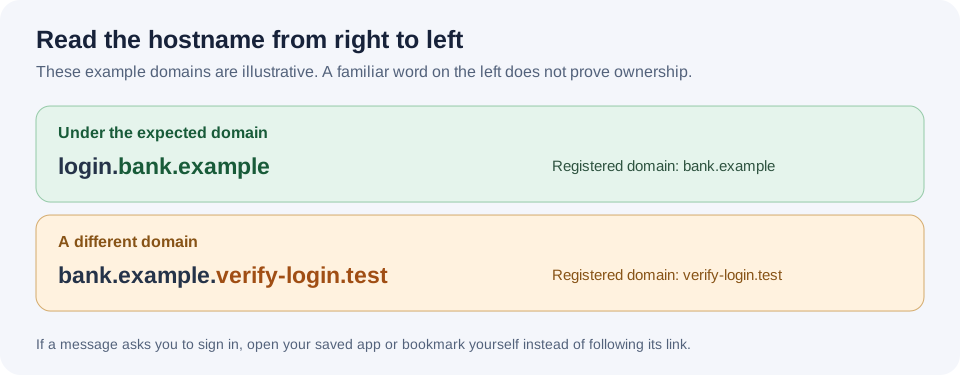
Hover over it on a computer, or press and hold on a phone, and read the address that appears. The only part that matters is the registrable domain: the label directly before the top-level domain. Read hostnames right to left.
- accounts.yourbank.com, a subdomain of the real domain. Fine.
- yourbank.com.verify-id.example, the domain is verify-id.example. The brand is decoration.
- yourbank-secure.example, a different registration entirely, bought to look adjacent.
- yourbank.com@evil.example, everything before the @ is ignored by the browser. The destination is evil.example.
Be wary of shorteners, which hide the destination by design, and of links inside PDFs and documents, where the visible text and the target are trivially different. On mobile the address bar truncates, which is exactly why mobile phishing converts better than desktop.
The one habit that defeats most of this: never authenticate from a link. If a message says there is a problem with an account, close it and reach the organisation the way you normally do, your own bookmark, the app on your phone, the number on the back of your card. If the problem is real it will be waiting for you there. This single rule neutralises almost every phishing message regardless of how well it is made, because it removes the attacker's chosen route.
The current techniques worth recognising
Fake verification pages that ask you to run a command
You land on a page showing what looks like a CAPTCHA or a document that will not load. It instructs you to press a keyboard shortcut and paste something to prove you are human, or to fix the error. The clipboard has already been filled with a command that downloads and runs malware, and because you typed it yourself, no download warning appears.
No legitimate website has ever needed you to paste a command into your operating system to view a page. This technique is currently one of the largest sources of infostealer infections, which is a route worth understanding in full, see why your password leaked when nobody was breached.
QR codes
A printed or emailed code moves the attack onto your phone, where the address is hardest to inspect and corporate protections usually do not reach. They turn up as parking notices, fake payment terminals, restaurant menus and "scan to complete your MFA setup" posters. Treat a QR code exactly as you would a shortened link from a stranger.
Thread hijacking
The hardest kind to catch. An attacker inside a real mailbox, a supplier's, a colleague's, replies within a genuine existing conversation, quoting the history, from the real address. Every authentication check passes, because the mail is authentic. The only tell is the content: a change of bank details, an unexpected attachment, a new urgency that does not fit the thread. Any request to change payment details that arrives by email should be verified by voice, on a number you already had.
Multi-factor fatigue and code phishing
Repeated push notifications until someone approves one to make them stop. Or a call, moments after a login attempt, from "the fraud team" asking you to read out the code you just received. No legitimate organisation will ever ask for a one-time code, the whole purpose of the code is that it is not shared. Approve a push only when you initiated the action yourself, seconds earlier.
Callback phishing
An invoice or subscription renewal for something you did not buy, with no link at all, just a number to call and cancel. The number reaches the attacker, who talks you into installing remote access software. The absence of a link is what gets it past filters, and what makes it feel safe.
Checking a sender properly
Expand the actual address rather than trusting the display name, which is free text and set by the sender. Then check the reply-to, which is where your response actually goes and is frequently different. In a mail client that shows headers, an authentication summary indicating that SPF or DMARC failed is a strong signal, but note that it passing proves only that the message came from the domain it claims, and a lookalike domain passes its own checks perfectly. The email authentication guide explains exactly what those results cover.
If you have already clicked
Speed matters more than thoroughness, and the order matters.
- If you entered a password: change it immediately from a different, trusted device, and change it anywhere you reused it. Then sign out of all sessions on that account, a stolen session cookie keeps working after a password change, and this is the step people miss.
- Check for persistence. In your mail settings, look for forwarding rules, filters that delete or archive incoming mail, and any new app password or connected application. Adding a quiet forwarding rule is the standard next move after a mailbox is taken, and it survives every password change you make.
- Re-check your multi-factor enrolments and remove any device or authenticator you do not recognise.
- If you ran a command or installed anything: treat the device as compromised. Change passwords from a different machine, not that one, and rebuild it. Cleaning is not reliable against modern infostealers.
- If you paid or shared card details: contact your bank now and say the word fraud. Time is the variable that decides whether a payment can be recalled.
- If it was a work device or account, report it immediately. Early reporting is the difference between a password reset and an incident, and every security team would rather hear it in the first hour.
- Report the message. Mail providers, browser safe-browsing programmes and national reporting bodies all take submissions, and each report shortens the life of the infrastructure behind it.
Phishing that follows a breach is more convincing, because it is informed. When a company is breached, the attacker knows you are a customer, and often what you bought and when. A message that cites a real order, days after a real incident, will get past people who would have deleted a generic one. Checking what your address is exposed in tells you which brands you should expect to be impersonated to you.
The long-term fix
Two changes make most credential phishing structurally impossible rather than merely detectable. A password manager will not autofill on a lookalike domain, because it matches the domain exactly, it declines to fill when you would have typed it in anyway, and that refusal is a warning you get before you make the mistake. And passkeys or security keys bind the credential to the real site's domain, so a convincing replica cannot use them at all; there is nothing to phish, because there is no secret you can be persuaded to hand over. Both are covered in the two-factor guide.