 MyRecon OSINT
How to Verify an OSINT Finding Before You Act on It
A username search gives you a list of accounts sharing a handle. That is a starting point, not a conclusion. The gap between "this account uses the same name" and "this account belongs to this person" is where almost every mistaken identification lives.

Why the same handle is weak evidence
Popular handles are registered many times over by unrelated people. Short handles are registered thousands of times. Even distinctive ones collide, and are deliberately squatted on across platforms by people reserving names.
We saw a clean illustration while testing. Searching for torvalds: obviously suggesting Linus Torvalds, returned a match on a professional network, which resolved to an account titled "Patricia Torvalds". A real account, a real person, the handle matching exactly, and a different human being.
An automated tool cannot resolve that. Only evidence can.
Three tiers of evidence
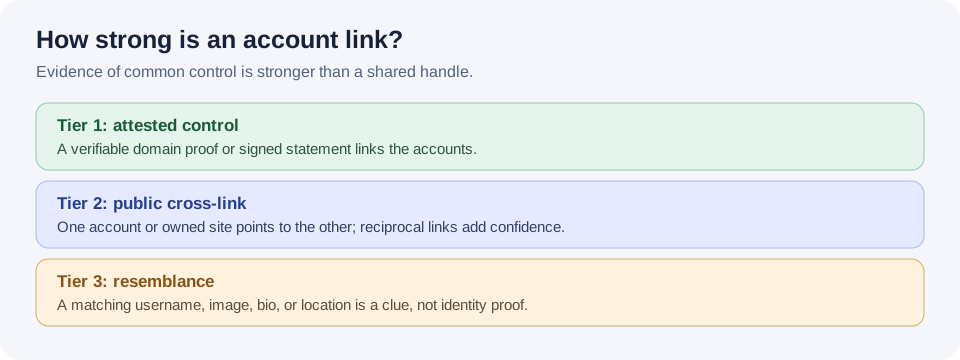
Not all corroboration is equal. Sorting it into tiers keeps you honest about what you actually have.
Tier 1: cryptographic or platform-attested
The strongest evidence, and the rarest. The account proves control of something else:
- Keybase-style signed proofs. A signed statement linking accounts, which you can verify mathematically rather than trust.
- Verified domain ownership. A DNS record or well-known file proving the same party controls a website.
- Platform verification badges, where the platform performed identity checks itself.
If you have this, you are close to certain. Note that it proves common control of two accounts, which is subtly different from proving who the human is.
Tier 2: self-declared cross-links
The person has publicly connected the accounts themselves:
- A link in one bio pointing to the other profile
- A personal site listing both
- The same public email address on both
- A link-in-bio page collecting them
Strong, and usually enough for practical purposes. Check that the link is reciprocal where possible, anyone can link to a profile they do not own.
Tier 3: circumstantial patterns
Everything else: identical display names, the same profile photo, matching bios, consistent locations, overlapping interests, accounts created around the same time.
Any one of these is weak. Several together are suggestive, never conclusive. Photos in particular are unreliable, profile pictures get copied, and impersonation accounts copy them deliberately.
The verification method
1. Open it logged out
Use a private window. What you see logged in is shaped by your own network and history; a logged-out view is closer to what is genuinely public, and it is what an automated tool saw when it reported the result.
2. Confirm the account exists at all
Read the page title. Does it name the account, or just the site? A title reading "Trello" or "WordPress.com" instead of the handle usually means you are looking at a generic page that would have loaded for any name.
Then run the control: try an obviously invented handle on the same platform. If it produces a similar page, that platform cannot answer this question and the "match" is an artefact.
3. Look for per-account content
Posts, follower counts, a join date, activity history. These cannot be rendered without the account existing. Their absence on a page that otherwise looks fine is a strong hint you are seeing a shell.
4. Hunt for a Tier 1 or Tier 2 link
Read the bio properly. Follow links out. Check whether the destination links back. This single step resolves most questions and takes a minute.
5. Check consistency over time
An account created in 2012 that has posted steadily is harder to fake than one created last month. Compare timelines: if a person's other accounts have a decade of history and this one appeared recently with copied photos, consider impersonation.
6. Write down your confidence, and why
Force yourself to state it: "probable, based on a reciprocal bio link and matching display name". If you cannot name the evidence, you do not have a finding, you have a hunch.
Traps that catch experienced people
The archive trap
A profile that 404s today may have existed for years. Archive.org often holds snapshots, which can confirm that an account existed and what it said, genuinely useful. The trap is treating an old snapshot as current. A bio from 2019 describes 2019.
The blocked-check trap
If a platform rate-limits or blocks you, you have learned nothing, but a tool may present that as "not found", and you may remember it as "they are not on that platform". Absence of evidence is not evidence of absence, and this is the most common way that error enters an investigation.
The aggregation trap
Each fact may be individually public and harmless. Assembled, employer, neighbourhood, gym schedule, partner's name, children's school, they become something none of them was alone. That is worth pausing on regardless of what you intend, and it is the reason to keep investigations to your own footprint or ones you are formally authorised to examine.
The confirmation trap
Once you believe an account belongs to someone, every detail starts looking like corroboration. The discipline that helps: before you conclude, spend two minutes actively looking for evidence you are wrong. A different city in an old post. A timeline that does not fit.
Applying this to your own footprint
Most people reading this are checking themselves, which is easier, you already know the truth. What you are looking for is the shape of what a stranger could assemble.
Work through the results and sort them into three piles:
- Mine, and I want it public. Fine. Check the bio does not leak more than intended, a workplace, a home city, a partner's handle.
- Mine, and I forgot it existed. The most common and most valuable category. Old accounts hold old photos, old email addresses and old passwords, and are the usual route into an account-takeover attempt.
- Not mine. Someone else with the same handle, or an impersonation. Worth knowing which.
Then check the places people forget: public commit metadata that exposes an email address, EXIF data still attached to photos you have posted, and data-broker listings you never created. Our guide on reducing your digital footprint covers what to do about each.
The standard worth holding
Report what you can support, at the confidence you can support it, and say plainly when you do not know. "I could not verify this" is a legitimate finding and often the most honest one available.
A tool that hands you twenty results where nine are imaginary is worse than one that hands you five that are real, because you cannot tell which nine, and you will act on all twenty.