 MyRecon OSINT
How to clear your digital footprint and reduce public exposure
Your digital footprint is the trail of data you leave online, accounts, posts, breach records, and public profiles. You cannot erase it completely, but with a focused afternoon you can shrink it dramatically and take back control of what is easy to find.

Can you completely clear your digital footprint?
You can reduce what is publicly accessible, but complete erasure is not guaranteed. Start with a digital footprint check by email and username, verify which accounts are yours and remove unwanted details at the source. Search results, archived copies and provider backups may persist after a profile changes.
Track cleanup requests and verify the result
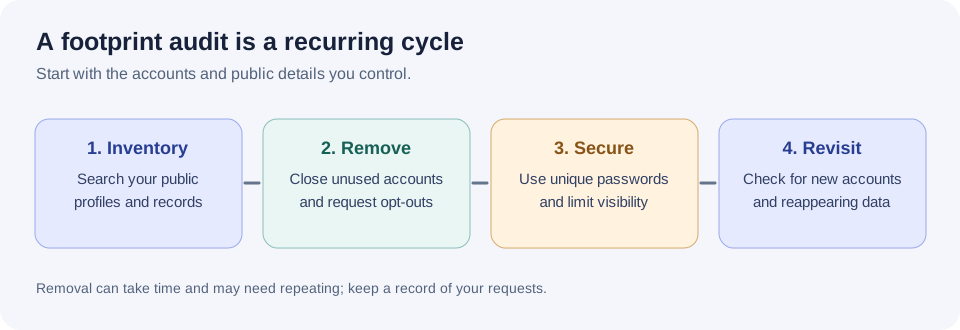
For each item, save the source URL, exposed detail, requested action and recheck date. Use official account settings or removal forms. After a request succeeds, open the original page again and separately check the search result. A removed search listing is not proof that the original information was deleted.
Step 1: Map what's already out there
Source removal and search removal are different
Delete or restrict the original content through the service that hosts it. Search-result removal changes discovery in that search engine and may leave the source page available. Verify both the original page and the search listing after a change, while allowing time for recrawling.
You cannot manage what you cannot see, so start with an honest audit of yourself. Search your main usernames and email addresses the way an outsider would. MyRecon's tools make this quick: run a username search to see which platforms carry your handle, and an email check to see which breaches your address appears in. Write down what you find, the accounts you forgot about are usually the biggest surprises.
Step 2: Close the accounts you no longer use
Every dormant account is a liability. It stores personal data, it can be breached, and it widens the surface an attacker can use to impersonate you. Go through the list from Step 1 and delete the accounts you no longer need. If a service makes deletion hard, at least strip the profile back: remove your real name, photo, and any personal details, and replace the email with a throwaway.
Step 3: Fix your passwords once and for all
Password reuse is the single biggest reason a footprint turns into an actual compromise. The fix is a password manager. Let it generate a long, unique password for every account so that a leak from one service can never unlock another. Then prioritise changing the password anywhere your email showed up in a breach.
Then add a second lock. Turn on two-factor authentication (2FA) on your most important accounts, email first, because it is the recovery point for everything else. An authenticator app or a hardware security key is stronger than SMS codes.
Step 4: Tighten what stays public
For the accounts you keep, review their privacy settings deliberately:
- Set social profiles to private, or at least remove your location, birthday, phone number, and workplace from public view.
- Turn off "search by phone number or email," which lets strangers find your profile from a single detail.
- Prune old posts and photos that reveal your home, routine, or relationships.
- Check the "connected apps" section and revoke third-party access you no longer use.
Step 5: Compartmentalise going forward
New habits stop your footprint from growing back. Use a separate, private email for sensitive accounts (banking, government, health) and a different, public-facing one for sign-ups and newsletters. Email aliases or plus-addressing let you create a unique address per service, so you can see exactly who leaked or sold your data, and cut it off. Consider varying your usernames for accounts you would rather not have linked together.
Step 6: Reduce data-broker exposure
Data brokers compile profiles from public records and sell them. Many operate opt-out processes that let you request removal of your listing. It is tedious and needs repeating periodically, but removing yourself from the largest brokers meaningfully cuts how easily your address and phone number can be found.
Step 7: Find the leaks you didn't create
The accounts you can remember are the easy half. The harder half is data that leaked out of something you did without realising it was public.
Your commit email address
If you have ever pushed code to a public repository, your email address is almost certainly published. Git stores user.email inside every commit object, and GitHub serves that through a public API, anyone can list your repositories and read the author address off your commits in about ten seconds. Most developers have no idea.
Check yours by opening any of your public commits and viewing the patch: append .patch to a commit URL and the From: line contains the address. To stop it, enable the noreply address in GitHub's email settings and turn on the option to block command-line pushes that expose your real address. That fixes future commits; historical ones keep the old address unless you rewrite history, which is usually not worth it, but knowing which address is exposed tells you which one to prioritise in your breach checks.
Metadata inside photos you have posted
Photos carry EXIF data: camera model, exact timestamp, editing software, and on phones with location services enabled, GPS coordinates accurate to a few metres. Large platforms strip this on upload. Forums, personal sites, marketplace listings, file-sharing links and messaging apps that send "as a file" frequently do not.
The practical risk is not a single photo, it is a pattern. A handful of images with coordinates reveals a home, a workplace, and the route between them. Before posting anywhere outside a major platform, strip metadata: on Windows, right-click the file, Properties, Details, "Remove Properties and Personal Information"; on macOS, export a copy rather than sharing the original.
Old versions of pages you have already changed
Deleting a bio does not delete what it said. The Internet Archive holds snapshots of pages going back years, and a profile you cleaned up in 2023 may still be readable as it was in 2019, including the employer, the city and the linked accounts you have since removed.
Search the archive for your own profile URLs and personal site. You cannot rely on removal, but you can at least know what is there, and it will tell you which details are already circulating and therefore not worth protecting any more.
Step 8: Understand what cannot be removed
Any service promising to erase you from the internet is selling a story. Being clear about the boundary saves you time and money.
Usually removable: data-broker listings that offer an opt-out, accounts you control, search-engine results for pages that no longer exist, and content you posted yourself on platforms you still have access to.
Usually not removable: court records and other public records, legitimate news coverage, other people's posts that mention you, archived copies, and anything already scraped into a dataset that has been copied onward.
For the second category the realistic goal is displacement rather than deletion, publishing enough accurate material under your own name that it ranks above the rest. Slow, but it is the only lever that actually exists.
Step 9: Check your exposure the way an outsider would
Everything above assumes you know what is out there. Auditing yourself has a blind spot: you search for what you remember. An outsider searches for what exists.
Do the audit properly by starting from the pieces, not the person. Take each handle you have ever used, each email address including the ones you abandoned, and each phone number, and search on those rather than on your name. Abandoned identifiers are where forgotten accounts live, and forgotten accounts are the ones with weak passwords, no two-factor authentication, and a decade-old recovery address that may itself be compromised.
Be careful how you interpret a "not found", though. Many platforms answer identically whether or not an account exists, so a clean result may mean the check could not be performed rather than that nothing is there, we go into the measurements behind that in why username checkers report accounts that don't exist. When a tool cannot tell, the honest reading is "unknown", and it is worth checking those by hand.
Make it a habit, not a one-off
A footprint grows quietly, so schedule a check-up two or three times a year: re-run a search on yourself, review new breach exposure, close anything you have stopped using, and confirm your key accounts still have 2FA. Twenty minutes on a recurring reminder keeps you far ahead of where most people ever get.
Start your audit now with the MyRecon tools, and read our companion guide on checking whether your email was in a data breach.